
This guide covers what to prepare, the steps to follow, the factors that matter most, and the mistakes worth avoiding — including when a home office isn't actually the right solution for your work.
TL;DR
- Define your daily work activities before choosing furniture — your tasks dictate everything from desk size to soundproofing
- Ergonomics, lighting, and organization directly affect your health and output, not just your comfort
- Personalization through color, decor, and layout reduces mental fatigue when done with intention
- Common setup mistakes — ignoring natural light, skipping cable management, prioritizing style — undermine even well-designed offices
- When your work involves equipment, clients, or inventory, a dedicated external workspace delivers ROI that a home office simply can't match
How to Create a Personalized Office Space Step by Step
Step 1: Define What "Working for You" Actually Means
Before you look at furniture or measure a room, document your daily work activities. Do you take video calls? Handle physical materials? Do long stretches of deep-focus writing or analysis? See clients? Your answers determine desk size, storage needs, soundproofing requirements, and even which room in your home makes sense.
From there, identify your non-negotiables:
- Privacy level — do you need a door that closes, or is an open corner workable?
- Screen space — single monitor, dual monitors, or a large display plus a laptop?
- Power access — how many devices need to be plugged in simultaneously?
- Physical equipment — printers, cameras, tools, or filing systems that take up floor or desk space
The more specific you get here, the less likely you are to buy something that looks great online but fails in actual use.
Step 2: Choose and Assess Your Space
Evaluate your available rooms against your defined needs. Prioritize:
- Natural light — proximity to windows, and which direction they face
- Noise proximity — distance from the kitchen, living room, shared walls, or children's areas
- Square footage — enough room for your furniture without feeling cramped or blocked
Then check the practical infrastructure: electrical outlets, internet signal strength in that specific room, and ventilation quality. A room that checks every other box but has a dead WiFi signal is still the wrong room for a remote worker.
Step 3: Plan Your Layout Before You Buy Anything
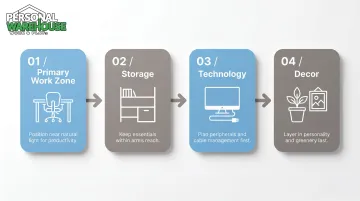
Sketch the room to scale — even a rough hand drawing works. Position elements in this order:
- Primary work zone (desk + chair) — place this first, near natural light but not in direct glare
- Storage — shelving, filing, or drawers within arm's reach of where you'll be seated
- Technology — monitors, peripherals, and cable routing
- Decor — fill in last, not first
Consider your movement patterns during the workday. Do you need to reach physical files frequently? Switch between sitting and standing? Reference a whiteboard? Your movement should drive the layout, not the room's existing furniture arrangement.
Step 4: Set Up Ergonomics and Equipment
Most people rush this step, and the consequences show up months later as chronic pain. A 2025 systematic review of 24 randomized controlled trials covering 4,086 workers found that ergonomic interventions produced a measurable reduction in musculoskeletal pain, with the strongest protective effects for the lower back, neck, and upper back.
Ergonomic setup basics:
- Desk height — forearms parallel to the floor when typing
- Monitor position — top of screen at or just below eye level, roughly arm's length away
- Chair — supports your lower back, feet flat on the floor or on a footrest
- Keyboard and mouse — close enough that your shoulders aren't reaching forward
Technology setup order:
- Reliable internet connection (test signal strength in the room first)
- Primary screen setup
- Peripherals — keyboard, mouse, webcam, headphones
- Cable management — under-desk trays, clips, or sleeves to contain wires before they multiply
Do cable management at setup, not retroactively. Sorting wires on day one takes 20 minutes; untangling six months of cable chaos takes considerably longer.
Step 5: Layer in Personalization That Supports Your Work Style
Personalization isn't decorating for its own sake — it reduces mental fatigue and makes you want to spend time in the space.
Color palette by work type:
- Neutral tones (white, beige, grey) — for deep-focus or analytical work
- Earthy greens and warm wood tones — for creative work that benefits from a calm, grounded feel
- Bold accent walls — for tasks that benefit from stimulation and energy
Personal elements worth including:
- Wall art that means something to you (not just filler)
- A plant — even one small plant improves how a space feels
- A rug to visually define the work zone, especially in open-plan spaces
- One or two personal objects that make the space feel occupied, not staged
Lighting layers:
- Maximize natural light — position your desk perpendicular to the window, not facing it directly
- Add a warm-toned adjustable desk lamp for task lighting
- Use soft ambient fill (a floor lamp, LED strips) to balance the room at different times of day
What You Need to Prepare Before Setting Up Your Office Space
Before buying anything, assess three fundamentals: your space, your budget, and how you actually work. Skipping this step is how people end up replacing furniture they just bought.
Space and Infrastructure Requirements
Start with the basics before committing to any layout or furniture:
- Measure length, width, ceiling height, and outlet locations
- Test your internet signal strength in the intended room
- Confirm you have at least 50–70 square feet — 50 sq ft covers a single-desk setup, 70 sq ft adds room for storage without feeling cramped
Budget and Priority Mapping
Set a tiered budget that separates must-haves from nice-to-haves:
| Priority | Items | Notes |
|---|---|---|
| Must-have | Ergonomic chair, desk, task lighting | Allocate the majority of your budget here |
| High value | Monitor arm, cable management, noise solution | Noticeable daily impact |
| Nice-to-have | Premium storage, decor, accessories | Fill in after essentials are covered |
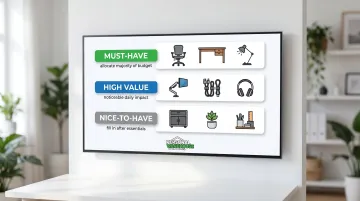
Spend on items you use for hours every day. A $400 ergonomic chair matters more than a $400 bookshelf.
Work Style and Task Inventory
List your task types and roughly how many hours per day each takes. This determines whether you need:
- A standing desk (if you spend 6+ hours seated)
- A second monitor (if you reference multiple documents simultaneously)
- Noise-cancelling headphones (if your environment is unpredictable)
- Dedicated file storage (if you manage physical documents regularly)
Key Factors That Determine How Well Your Office Space Works
Getting the setup right matters — but the day-to-day experience depends on four underlying factors. These are what separate a workspace that sustains you from one that quietly drains you.
Lighting Quality
Poor lighting — too dim, too harsh, or the wrong color temperature — increases eye strain and fatigue within hours. The Illuminating Engineering Society recommends 300–500 lux for desk work, while research supports approximately 4,000K (neutral-white) as the color temperature that best balances alertness and visual comfort for sustained task work.
A layered approach — natural light, an adjustable task light, and soft ambient fill — lets you adapt to different times of day and task types, something a single overhead bulb simply can't do.
Noise and Distraction Management
Research by Gloria Mark at UC Irvine found it takes approximately 25 minutes to return to a task after an interruption — and people typically work faster afterward, but experience more stress, frustration, and mental fatigue as a result.
Physical solutions that actually help:
- A door you can close (the simplest and most effective option)
- A white noise machine near the door or shared wall
- Acoustic panels if you're on frequent video calls
- Repositioning the desk away from noise corridors
Storage and Clutter Control
Visual clutter isn't just an aesthetic problem. Princeton Neuroscience Institute research found that multiple stimuli in your visual field compete for neural representation, pulling focus and draining mental energy — even when you think you're ignoring the mess.
The fix isn't minimalism — it's intentional organization. Give every item a dedicated home: charging cables, physical documents, office supplies, peripherals. That small structure eliminates the background friction of constantly searching for things, freeing up mental bandwidth for actual work.

Separation Between Work and Life
Without a physical or visual boundary between work and living space, your brain struggles to fully switch off. Gallup's 2025 research found that only 36% of fully remote workers are thriving overall despite high engagement rates.
The culprits: elevated loneliness, difficulty disconnecting, and what Microsoft's Work Trend Index calls the "infinite workday" effect — where work bleeds into evenings and weekends with no clear stopping point.
Even simple cues create meaningful mental separation:
- A door you close at the end of the day
- A specific rug that defines the "office zone"
- A consistent end-of-day ritual (a walk, shutting down all devices, changing out of work clothes)
Common Mistakes to Avoid
Even a well-intentioned setup can fall apart over a few easily avoided missteps. Watch out for these:
- Layout last — buying furniture before planning the room means pieces that block light, clash in scale, or force an awkward angle to your screen. It's expensive to undo.
- Style over support — a chair that looks good but lacks lumbar support causes real physical strain within weeks. A desk at the wrong height isn't far behind.
- No cable plan at setup — adding devices incrementally without a management system creates tangles that undermine an otherwise clean workspace.
- Ignoring audio until it matters — background noise and poor mic quality don't just affect your focus; they shape how colleagues and clients perceive you on calls.
When a Dedicated External Workspace Makes More Sense Than a Home Office
A well-designed home office solves a lot. But it has real limits — and for many small business owners, creative professionals, and collectors, those limits show up faster than expected.
The clearest signals that you've outgrown a home setup:
- You need to store inventory, equipment, or large collections
- Clients visit and you want a professional environment
- Your work involves noise, tools, or mess that conflicts with home life
- You simply need more square footage than a spare bedroom offers
For those situations, an owned, customizable external workspace gives you a purpose-built environment that scales with your operation. Personal Warehouse offers Personal Warehouses®, Professional Work Suites, and Creative Office spaces designed for exactly this transition, with features like all-LED lighting, superior high-efficiency insulation, and optional mezzanines that expand usable area by up to 30%.
Each unit can be customized to fit the actual work happening inside:
- HVAC systems for climate-sensitive inventory or equipment
- Private restrooms and kitchenettes for all-day use
- Automatic door operators for easy equipment access
- Configurations suited to photo studios, fabrication shops, and collector spaces alike
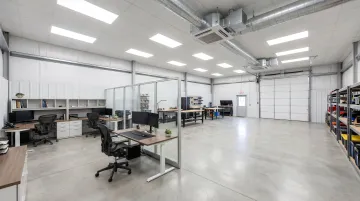
What separates this from a standard lease is the ownership model. Rather than paying monthly rent with no return, buyers own their unit outright — with financing available through preferred lenders on SBA 504 and 7(a) terms comparable to a residential loan. The 99-year ground lease structure provides all the benefits of ownership without the cost of land, and owners can hold, lease, or sell their unit as an appreciating asset.
Ultimately, the right choice comes down to what your work physically demands. Knowledge workers with minimal equipment can thrive in a well-designed home office. Those managing inventory, handling clients, or running hands-on operations will find that a dedicated external space delivers something a spare bedroom simply can't: room to run a real business.
Frequently Asked Questions
How much space do I actually need for a home office?
A functional single-person setup requires a minimum of 50–70 square feet. The lower end covers a desk and chair with little else; the higher end accommodates storage and a more comfortable working footprint. If you host video calls, factor in enough background space to look intentional on screen.
What is the single most important piece of furniture for a home office?
The chair. It directly affects your posture and physical health over long workdays, and the consequences of a bad one show up within weeks. An ergonomic chair with lumbar support should take budget priority over even the desk itself.
How do I personalize my office without spending a lot?
Focus on high-impact, low-cost changes: reposition your desk for better natural light, add one plant, use a desk mat to define the workspace, and hang one piece of meaningful wall art.
What type of lighting is best for a home office?
A neutral-to-warm desk lamp in the 3,500K–4,500K range, combined with maximized natural light and soft ambient fill, covers most situations well. Avoid harsh cool-toned overhead fluorescents — they cause eye strain faster than almost anything else in a workspace.
How do I reduce distractions when working from home?
Physical solutions first: choose a room with a door, use a white noise machine near noise sources. Then behavioral ones: communicate your work hours to anyone else in the home, and turn off non-work notifications during focus blocks.
When should I consider a workspace outside my home?
When your work involves physical equipment, client visits, noise, inventory, or simply requires more square footage than your home can spare without sacrificing living space. If work is regularly spilling into your home environment in ways that feel unsustainable, that's the signal.